Введение

Buttons on your phone sticking or not working? Here's how to replace them!

  1. UFhaL3UyvLLJsLPr
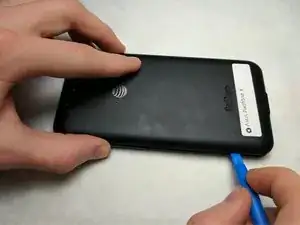
    • Pry off the back cover with the blue plastic opening tool.

    • Removing the cover may require a bit of force.

  2. XCDBWHmpW1ERJYrK
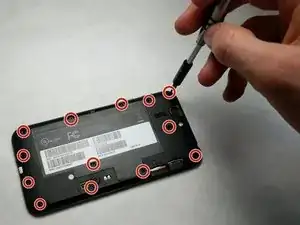
    • Remove thirteen 3.6mm screws using the T5 Torx Screwdriver.

  3. XrD56RgWif4YQo1Y
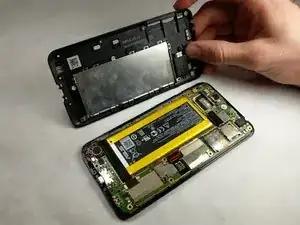
    • Once the screws are removed, the mid-frame can be lifted off of the phone.

  4. JvAeep6auec3qqQE
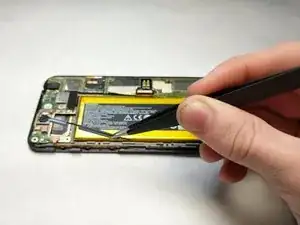
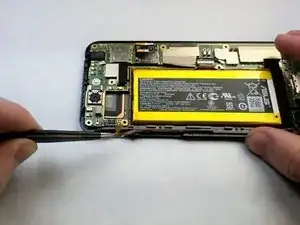
    • Grasp the button strip with tweezers.

    • Pull the buttons upwards gently. The buttons should remove easily.

  5. ybQVOBTyacFRTGFK
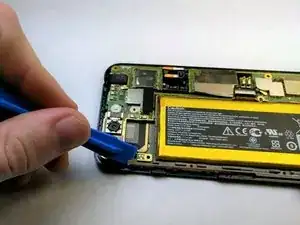
    • Use the blue plastic opening tool to disconnect the orange sensor strip.

    • Applying too much force may damage the connector.

  6. YxeXBImVNvjvA1uL
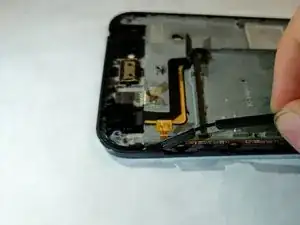
    • Grasp the sensor with the tweezers.

    • Pull outwards away from the phone.

    • The sensor is held on by adhesive. You will need to apply some force when removing.

Заключение

To reassemble your device, follow these instructions in reverse order.

Madeline Dement

Участник c: 24/01/17

114 Репутация

0 комментариев