Введение

This is a guide on how to replace the USB port on the Lenovo IdeaPad 1 14IGL7. You may need to consult this guide when your USB devices are not connecting to your device. Please take precaution to not cause harm to the device.

  1. whaWhLUBVKRwboaL
    • Power off your laptop before beginning disassembly.

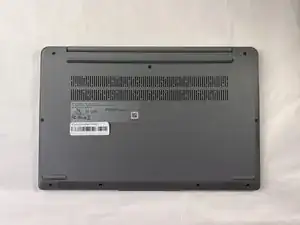
    • Place the computer upside down on a flat surface.

  2. KFV3WJeADFXjfKtI
    KFV3WJeADFXjfKtI
    EufREiwOYaX5HHAK
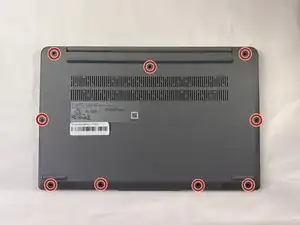
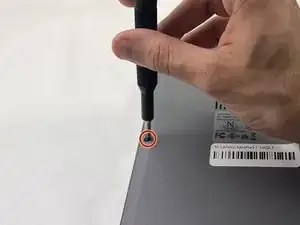
    • Remove the nine 7 mm screws from the back panel using a Phillips #00 screwdriver.

  3. 3S4c3rCVrL4Ra6hN
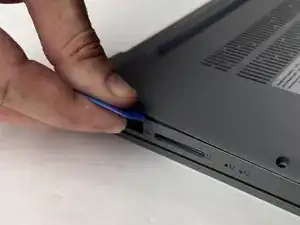
    • Insert an opening pick between the back panel and the body of the laptop.

    • Pry up the latches around the back panel and remove the panel from the laptop.

  4. W4tAOnye3cTfK3Wq
    W4tAOnye3cTfK3Wq
    wMSQ3aqOEMjNSTcd
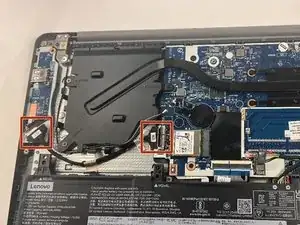
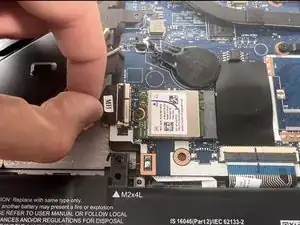
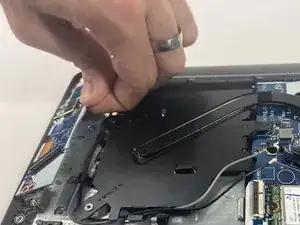
    • Gently detach each end of the cable connecting the USB port to the motherboard.

  5. NYVtVciZxSHGkSjr
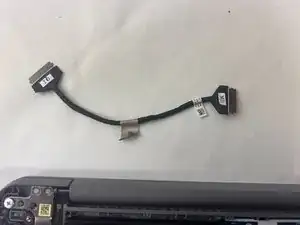
    • Carefully remove the cable from the device and set it aside.

  6. yuMT4lCcOPXc6EZr
    yuMT4lCcOPXc6EZr
    HYjdWgQDsj2JTOZB
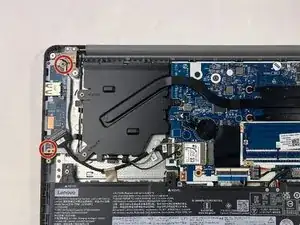
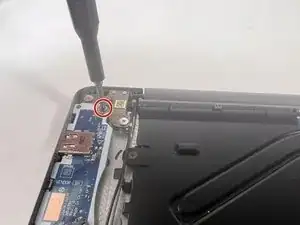
    • Use the Phillips #00 screwdriver to remove the two 3 mm screws that hold the USB port in place.

  7. ZYaK2QaxjfnNTNPd
    • Grab the right side of the USB port and gently lift it away from the device.

Заключение

To reassemble your device, follow these instructions in reverse order.

Nathan Costa

Участник c: 18/03/24

393 Репутация

0 комментариев